Mosaics: raw tiles and fusion
Some acquisitions are saved as many separate tiles (stacks acquired at different stage positions) instead of one image. zarrsmith.mosaic_manager reads such tiles lazily, shows them in napari at their position and fuses them into one OME-Zarr image.
A mosaic manager is different from a microscope manager: a MicroscopeManager is one image, while a MosaicManager is a set of positioned tiles that only becomes an image once it is fused. The fused result is an ordinary OME-Zarr dataset, so everything else in ZarrSmith works on it.
Class |
Reads |
Status |
|---|---|---|
|
raw Luxendo acquisitions ( |
available |
|
Opera Phenix / Operetta Harmony exports ( |
available |
|
Zeiss tile scans (one |
available |
These readers are for the raw tiles. Data already fused by the vendor software is read with LuxendoManager, OperaManager (Harmony’s stitchresult/*.ome.tiff) and ZeissManager.
Every reader first checks that the folder is not another microscope’s: a Harmony export (Images/Index.xml) opened with LuxendoMosaicManager, or a Luxendo acquisition (*.lux.h5) opened with OperaMosaicManager, stops at once with a WrongReaderError naming the right reader. detect_microscope(path) returns "zeiss" (a .czi file), "opera", "luxendo" or None; zarrsmith fuse uses it when --microscope is not given, and the napari widget switches its Microscope choice to the detected one.
A runnable walk-through with synthetic data is in examples/10_mosaic_fusion.ipynb.
Load and inspect
from zarrsmith.mosaic_manager import LuxendoMosaicManager, plan_fusion

mosaic = LuxendoMosaicManager("path/to/2026-10-14_103957")   # acquisition folder (contains raw/)
mosaic.channels          # ['autofluo-488', 'cFos-647']
mosaic.groups            # ['L', 'R']  (illumination side)
mosaic.bounding_box()    # ((zmin, ymin, xmin), (zmax, ymax, xmax)) in micrometer

# Output shape and size, without reading any pixel data
print(plan_fusion(mosaic.tiles, ds=(4, 8, 8)).summary())

# Check placement: one napari layer per tile, at its stage position
mosaic.visualize(tiles=mosaic.select(channel="cFos-647"))
Loading reads only the JSON files (in parallel) and a single .h5 header, so it stays fast on network drives.
mosaic.tiles is a list of Tile objects: a lazy (z, y, x) array (data), the position of its first voxel (origin), voxel_size, channel, an optional group and reader-specific attrs. mosaic.tile(i) returns one tile as an ArrayManager.
For Luxendo data, the two illumination sides of a dye (e.g. autofluo-488-L and autofluo-488-R) become one channel (autofluo-488). The side is kept as the tile group. If a stack was re-acquired (*_R_<n>.lux.h5), only the latest retake is used.
Opera (Harmony exports)
from zarrsmith.mosaic_manager import OperaMosaicManager

mosaic = OperaMosaicManager("path/to/plate__2026-06-18T20_23_37-Measurement 1")  # contains Images/
mosaic.channels          # ['DAPI', 'Alexa 647_extended', ...]  (ChannelName of the index)
mosaic.fields            # ['A3_field0', 'A3_field1', 'B2_field0', ...]
mosaic.fuse("A3_MIP.ome.zarr", field="A3_field1", projection="max")
The path is the Harmony export folder, its Images folder or the Index.xml itself. Loading reads only the index (one pass, also for indexes of several hundred MB) and one TIFF header. Every Opera field of every channel is one tile, made of its planes (r01c03f01p01-ch1sk1fk1fl1.tiff, …); tile ids are channel/r01c03f01 ("r01c03f01" names that position in every channel).
Fields per well. Tiles are grouped into fields within each well and the fields are named after it:
A3_field0,A3_field1, … These are the clusters that Harmony stitches intoA3_F1.ome.tiff,A3_F2.ome.tiff, …Wells on the plate. Harmony gives stage positions relative to the centre of each well, so each well is shifted to its place on the plate (A1 at the top left), using the well pitch of the plate format (
PlateRows×PlateColumnsin the index: 9 mm for 96 wells, 4.5 mm for 384, …). Without a known format, wells are placed side by side. This only affects where the wells are shown, not the fused images.Geometry, as in the images stitched by Harmony (and read by
OperaManager). The x/y pixel size is theImageResolutionof the index times the scale of the channel’sOrientationMatrix, a calibration of a few percent (e.g. 0.5934 µm × 0.968 = 0.5744 µm). Tiles are centred on their field position, with the stageyaxis running against the image rows. Planes are placed at theirPositionZ, so the z step is the stage step.Flat-field correction (
flatfield=True, the default). Harmony stores, for every channel, a background profileP(a 2D polynomial with a mean of 1) and the mean background levelMean(FlatfieldProfilein the index, orFFC_Profile/*.xml). Every plane is corrected as Harmony does: pixels above the background level,raw >= Mean·P, becomeraw - Mean·(P - 1)(the uneven background is removed), darker pixels becomeraw / P, both rounded to the data type. The result matches Harmony’s stitched images to within rounding. Channels with anIdentityprofile (e.g. brightfield) are not changed;mosaic.flatfieldslists the correction of every channel. Passflatfield=Falsefor the raw data.
Planes that Harmony marks as failed are read as zeros.
Zeiss (tile scans)
ZeissMosaicManager reads one .czi file, not a folder:
from zarrsmith import mosaic_manager as mos

mosaic = mos.ZeissMosaicManager("tile_scan.czi")
mosaic.fields            # ['scene0_TR1', 'scene1_P1']: one field per scene
mosaic.timepoints        # [0, 1]
mosaic.fuse("TR1.ome.zarr", field="scene0_TR1", ds=(1, 2, 2))

mos.ZeissMosaicManager("tile_scan.czi", scene_index=1)   # only this scene
Fields are scenes. Every tile region or position of the ZEN experiment is one field, named after its index and name. Tile ids look like
AF488-T2/scene0_TR1-m01.Placement.
yandxcome from the pixel coordinates of the tile in the file, which are the stage position rounded to a pixel, andzfrom theFocusPositionof its first plane. Tiles are not registered, so the result can differ from the images stitched by ZEN by a few pixels.Timelapses. The file records slightly different positions at every timepoint. By default every timepoint is fused with those of the reference timepoint;
reference_timepoint="all"uses those of each timepoint, see Timepoints. The fused output has 1 second per timepoint, like every fused timelapse, not the interval of the experiment.Files without tiles, such as the output of ZEN’s Stitching, are refused: read them with
ZeissManager.
Fields
A mosaic can hold several separate fields, for example two samples or two regions imaged in one acquisition. Tiles whose boxes overlap or touch (within one voxel) form one field: a connected component. When a mosaic is loaded, every tile gets a field label, field0, field1, … numbered by position (by the y, then x, then z start of the field). A reader can set Tile.field itself; those labels are kept.
mosaic.fields                      # ['field0', 'field1']
mosaic.field_tiles("field1")       # the tiles of one field
mosaic.select(field="field1", channel="cFos-647")
Fields are fused one at a time. mosaic.fuse(out) fuses the first field (field0) by default; pass field="field1" for another, and the output fits that field. Tiles from several fields are never fused together: fuse, fuse_tiles and the command line refuse with an error (MultipleFieldsError) before anything is read or written. Skipped tiles count, since they still set the output geometry. plan_fusion still returns a plan for such tiles, with plan.error set and the error in plan.summary().
visualize() gives all tiles of a channel the same contrast, starting at the whole range of the data type (0 to 65535 for uint16), so nothing is read before the tiles appear. The layers of a channel are linked, so changing the contrast or gamma of one tile changes all of them. Pass contrast_limits={"cFos-647": (100, 2000)} to set them yourself, or contrast_limits="auto" to estimate them from a small sample: a 64³-voxel block from the centre of up to 6 tiles near the middle of each group, about 3 MB of reads per channel (mosaic.contrast_limits()), which can be slow on a network drive.
Timepoints
A mosaic can hold several timepoints: mosaic.tiles then has the tiles of all of them, and mosaic.timepoints lists them. For Luxendo data a timepoint is the JSON time_point (or, without one, the order of the numbered acquisitions of a stack, Cam_bottom_00000, Cam_bottom_00001, …); for Opera data it is the TimepointID of the index.
mosaic.timepoints                  # [0, 1, 2, 3]
mosaic.select(timepoint=2)         # the tiles of one timepoint
mosaic.positions                   # one tile per position, the earliest of each

zm = mosaic.fuse("acq_t.ome.zarr", ds=(4, 8, 8), reference_timepoint=0)
zm.metadata["axes"]                # 'tczyx'

mosaic.fuse("part.ome.zarr", timepoints=[10, 11, 12])   # some timepoints, on the same grid
Every timepoint is fused with the geometry of one reference timepoint: the output grid, the offset of every tile and the transitions between tiles and groups are computed once from its tiles (the first timepoint by default) and applied unchanged to all timepoints. Positions reported at other timepoints are not used, so stage drift and changes of autofocus do not move a tile within the output. Parts of a timelapse fused in separate runs line up, since reference_timepoint does not have to be among timepoints.
The output has a leading
taxis:tczyx, ortcyxfor projections, with the timepoints in increasing order. It is not downsampled. Fusing a single timepoint gives notaxis. The fused timepoints and the reference are recorded in the root attributezarrsmith_fusion, because stepiof thetaxis is thei-th fused timepoint and not necessarily timepointi. The metadata does not give the time between timepoints: the output has 1 second per timepoint.Matching tiles. A tile at another timepoint belongs to the reference tile with the same channel, group and stack name (
attrs["stack"]); tiles without a stack name are matched by their order.A tile missing at some timepoint (e.g. an interrupted acquisition) stays blank there, with a warning. A tile without a counterpart at the reference timepoint is not fused, also with a warning, so choose as reference a timepoint with all positions.
A tile with another shape, voxel size or unit than its reference tile cannot be placed the same way: the fusion stops with an error naming it. Leave that timepoint out with
timepoints.Fields are labelled once per position, where it is first seen, so drift over time neither joins nor splits them.
field,tilesand tile ids name the tiles of every timepoint. Inskip, an id blanks that position at every timepoint and aTileobject only at its own timepoint.
visualize() shows one layer per position with a time slider, and every tile sits at its stage position of the current timepoint, see Napari. This is what the file reports: a fusion with a reference timepoint puts a tile in the same place at every timepoint, and reference_timepoint="all" follows the positions shown.
Own positions per timepoint
When the positions recorded at every timepoint should be used, for example because the stage really moved, pass reference_timepoint="all" instead of a timepoint:
zm = mosaic.fuse("acq_t.ome.zarr", ds=(4, 8, 8), reference_timepoint="all")
zm.root.attrs["zarrsmith_fusion"]      # {'timepoints': [0, 1, 2, 3], 'reference_timepoint': 'all'}
One output grid. Every timepoint has the same shape, so the grid covers the tiles of all timepoints of the mosaic, slightly larger than with a reference timepoint. Voxels of a timepoint that its tiles do not reach stay 0.
Positions. Every tile of every timepoint is placed at its own reported position, rounded to an output voxel, and the transitions between tiles and groups are computed for each timepoint. A tile therefore moves within the output when its reported position changes.
Parts line up. The grid does not depend on
timepoints, so parts fused in separate runs still line up, and a part has the size of the whole timelapse. Acropis given on this grid.A tile missing at some timepoint stays blank there, with a warning. Tiles may have another shape at another timepoint, but voxel size and unit stay the same for all tiles.
Reported positions are not registered. Whether they place the tiles better than one reference timepoint depends on how accurately the microscope reports them, so check the overlaps of the result.
3D fusion
zm = mosaic.fuse(
    "acq_3D.ome.zarr",
    ds=(4, 8, 8),          # downsampling (z, y, x) applied while reading the tiles
    blend="sigmoid",       # default: smooth transitions between tiles and illumination sides
    levels=3,              # pyramid levels
    workers=4,             # tiles read in parallel processes
)
zm.metadata["axes"]        # 'czyx'
2D maximum projection (MIP)
mip = mosaic.fuse(
    "acq_MIP.ome.zarr",
    projection="max",      # or "sum"
    ds=(1, 8, 8),          # only y/x matter for a projection
    workers=4,
)
mip.metadata["axes"]       # 'cyx'
The projection is computed at full resolution along z and then downsampled in y/x, so the output is small even for a large acquisition. A crop in z limits the planes that are projected.
Fusion options
Option |
Values |
Meaning |
|---|---|---|
|
|
downsampling applied while reading: each output voxel is the mean of its block (default |
|
|
3D volume (default) or a 2D projection along z |
|
|
how overlapping tiles are merged (default |
|
number > 0 |
steepness of the |
|
list of names |
tile channels to fuse, in output order (default: all) |
|
lists |
names and colours (hex or matplotlib names) of the output channels |
|
|
part of the output to write, in output voxels (after |
|
field name |
|
|
tiles or tile ids |
|
|
tiles or tile ids |
tiles to leave blank, see below |
|
integer, integer or |
pyramid levels (default 1) and factor between them (default 2) |
|
integer |
tiles read in parallel (default 1) |
|
dtype |
default: input dtype, |
|
|
axis along which |
|
list of timepoints |
timepoints to fuse (default: all), see Timepoints |
|
timepoint or |
timepoint whose tiles set the geometry of every timepoint (default: the first); |
|
bool |
replace an existing output, once the fusion has succeeded (see Existing outputs) |
|
path |
where the temporary fused level 0 goes (default: next to the output) |
Every other option of to_zarr is passed through unchanged, exactly as for zarrsmith convert: chunks (in output axis order, c, z, y, x or c, y, x, after a leading t for several timepoints), shards, shard_target_mb, shard_exclude_axes, zarr_format, ngff_version, compressor, compressor_level, drop_singleton, num_workers (write threads) and storage_options. See Advanced writing options. As with zarrsmith convert, a single fused channel is written without its channel axis unless drop_singleton=False.
mosaic.fuse(
    "acq_cfos.ome.zarr",
    ds=(2, 4, 4),
    channels=["cFos-647"], channel_names=["cfos"], channel_colors=["magenta"],
    crop={"z": slice(100, 400), "y": slice(0, 1500)},
    levels=4, downscale_factor=(1, 2, 2),
    chunks=(1, 32, 512, 512), shards="auto", shard_target_mb=512, zarr_format=3,
    workers=4, num_workers=8, temp_dir="D:/scratch",
)
Skipping tiles: skip lists tiles that are not read, for example tiles outside the sample or a failed stack. The output keeps the size and position it has with them, and their area stays 0 where no other tile covers it. Tiles are given as Tile objects or as ids: "cFos-647/1-x00-y00" (channel/stack, see mosaic.tile_id(tile)) for one tile, or "1-x00-y00" for that position in every channel.
mosaic.fuse("acq_MIP.ome.zarr", projection="max", ds=(1, 8, 8), skip=["1-x00-y00", "cFos-647/2-x05-y03"])
Blend modes:
sigmoid(default): a smooth transition across every overlap, so no seam is visible. Each voxel is a weighted mean of the tiles that cover it, with a weight that falls to 0 at the tile’s border. Across an overlap of two tiles, the share of one tile follows a sigmoid: 0 at its border, 1/2 in the middle of the overlap, 1 at the other tile’s border, whatever the overlap width. The tiles of each group are fused this way first; then, where two groups overlap (for example the left and right illumination sides), the image moves from one group to the other with the same sigmoid, centred wheremidlinewould cut.sigmoid_steepnesssets how sharp the transition is: the share of a tile goes from 10% to 90% over the central 50% of the overlap for 2, 27% for the default 4 and 14% for 8.max: keeps the brighter value.sum: adds the values, so overlaps show up as brighter bands.midline: usesmaxwithin each tile group. Where two groups overlap (for example the left and right illumination sides), the image switches sharply from one group to the other at the middle of their overlap, alongmidline_axis. Each side is then shown where its light sheet is sharpest.
plan_fusion(mosaic.tiles, ...) takes the fusion arguments (ds, projection, blend, channels, crop, skip, out_dtype, midline_axis, timepoints, reference_timepoint) and returns the level-0 geometry without reading anything: plan.summary(), plan.shape, plan.scale, plan.nbytes.
The fused output stores a display window for every channel (OMERO window metadata): the 0.5th to 99.9th percentile of the fused values of all timepoints, ignoring blank areas. Viewers that read it (napari-ome-zarr, Fiji, the Open result option of the napari widget) show the result with a usable contrast instead of the whole 0 to 65535 range. Read it with zarrsmith.mosaic_manager.display_windows(path).
How fusion works
Level 0 is fused one region at a time (256 × 256 output voxels in y/x for 3D, 1024 × 1024 for projections, over the full z range), at every timepoint, into a temporary zarr. For each region, only the tile voxels that fall inside it are read, downsampled and merged. Memory stays bounded and every full-resolution voxel is read once.
The fused level 0, which is already downsampled and therefore small compared with the raw tiles, is written to the output with ZarrSmith’s standard
to_zarr. Pyramid levels, chunks, shards, compression and singleton axes therefore behave exactly as for any other conversion. The temporary store is then deleted.
With workers > 1, the tiles of a region are read in worker processes when the tiles allow it (as Luxendo and Opera tiles do). h5py serialises reads within one process, so threads would not speed up reading HDF5 files. Merging and writing stay in the calling process. If worker processes cannot be started, fusion falls back to threads with a warning.
Raw tiles usually have no pyramid, so every fusion reads the full-resolution data, whatever ds is. On a network drive the read speed sets the run time. Put temp_dir on a local disk when the output is on a network share.
Command line
zarrsmith fuse fuses one mosaic, or many from a CSV file with --batch. Every output option of zarrsmith convert is available with the same flags. See Command line.
zarrsmith fuse -i /path/to/2026-10-14_103957 -z acq_3D.ome.zarr -rds 4 8 8 -nl 3
zarrsmith fuse -i /path/to/2026-10-14_103957 -z acq_MIP.ome.zarr -rds 1 8 8 -p max -b midline
zarrsmith fuse -i /path/to/2026-10-14_103957 -z acq_field1_MIP.ome.zarr -rds 1 8 8 -p max -f field1
zarrsmith fuse -i "/path/to/plate-Measurement 1" -z A3_MIP.ome.zarr -p max -f A3_field1        # Opera
zarrsmith fuse -i "/path/to/plate-Measurement 1" -z A3_raw.ome.zarr -p max -f A3_field1 -nff   # without flat-field
zarrsmith fuse -i /path/to/timelapse -z acq_t.ome.zarr -rds 4 8 8 -rtp 0                        # every timepoint, reference 0
zarrsmith fuse -i /path/to/timelapse -z part.ome.zarr -rds 4 8 8 -tp 10 11 12 -rtp 0            # some timepoints
zarrsmith fuse -i tile_scan.czi -z acq_t.ome.zarr -rds 1 2 2 -rtp all                            # own positions per timepoint
The fields are listed when the mosaic is loaded. Without -f/--fields (or -t/--tiles) the first field is fused. Asking for tiles from several fields prints an error and nothing is fused; in a --batch run that row is not done, the other rows still run, and the rows that were not fused are listed at the end.
Napari
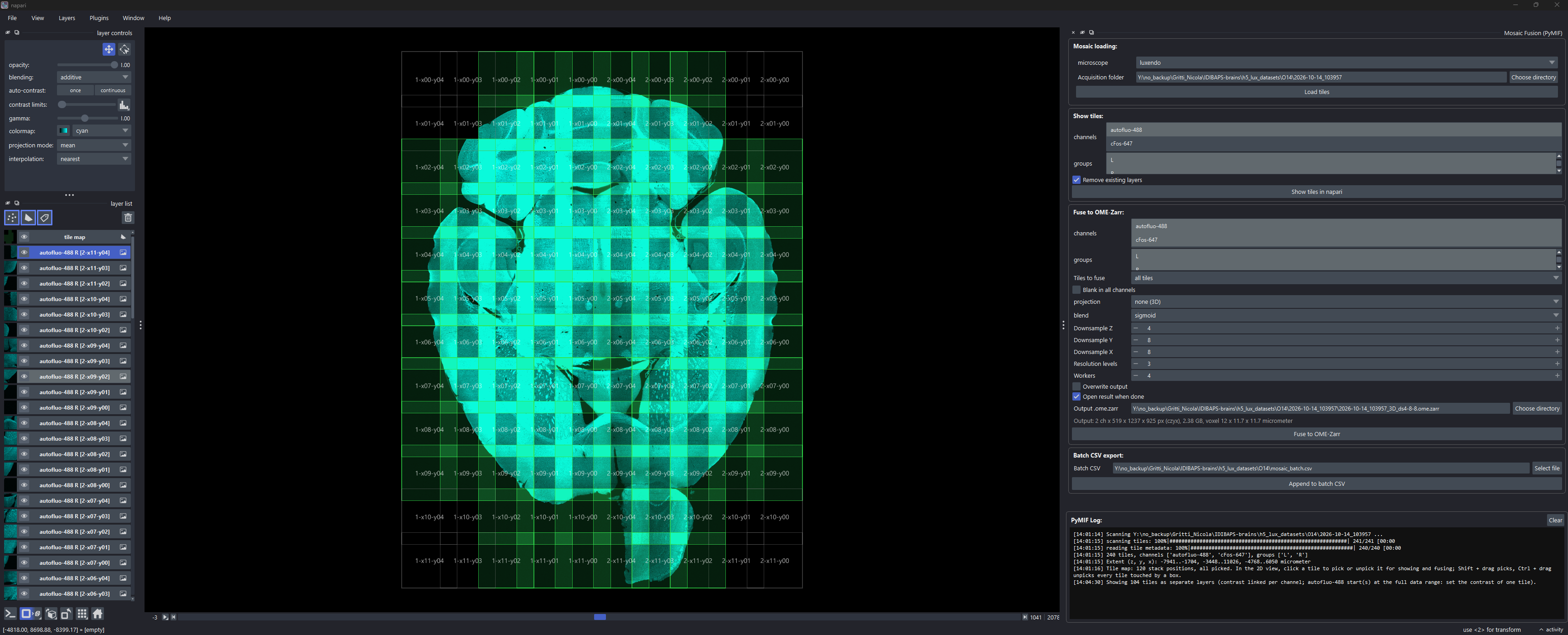
Plugins > ZarrSmith > Mosaic Fusion opens a widget with three boxes:
Mosaic loading: choose the microscope and the acquisition folder (browse, or drag and drop it, or any file inside it, from the file explorer), then Load tiles. Flat-field correction (Opera) (on by default) corrects Opera tiles as Harmony does; other microscopes ignore it. This reads metadata only and adds a tile map: a
tile mapshapes layer with one rectangle per stack position, labelled with its stack id, all picked (green). Click a rectangle in the 2D view to unpick it (grey) or pick it again; dragging still pans. Shift + drag picks, and Ctrl + drag unpicks, every tile that lies even partially in the box shown while you drag (a temporarytile map boxlayer, removed on release) (Shift or Ctrl + click: one tile). A rectangle stands for that position in every channel and illumination side. Only picked tiles are shown and fused. When the mosaic has several fields, each rectangle also shows its field, the log lists the stack positions of every field, and the fields selectors of Show tiles and Fuse to OME-Zarr start on the first field.Show tiles: show the picked tiles of the selected channels, groups and fields as one layer per tile at its stage position, with one linked contrast per channel. A channel starts at the whole range of its data type, so nothing is read before the tiles appear: set the contrast of one tile and the others follow. Every displayed plane reads data from all shown tiles, so show only a few channels or groups at a time. Change the picks on the tile map and click Show tiles in napari again to update the view; the contrast you set is kept, and Remove existing layers keeps the tile map. A mosaic with several timepoints opens on the first timepoint, and the T slider at the bottom of the image scrolls through time, each tile at its stage position of that timepoint, rounded to a voxel, so a tile moves when its position changes. The tile map stays at the position of the first timepoint. Only the planes displayed at the current timepoint are read. A timepoint without that tile shows as blank.
Fuse to OME-Zarr: the main fusion options, with a live estimate of the output size. For a mosaic with several timepoints, Timepoints selects those to fuse (all by default) and Reference timepoint the one whose geometry they all use (the first by default), or
allto place every timepoint at its own positions. Only the picked tiles of the selected field are fused, and the output fits them. Selecting several fields shows an error in the size estimate, and Fuse to OME-Zarr and Append to batch CSV then print an error and do nothing. With several fields, the default output name ends with the field, e.g.<acquisition>_3D_ds4-8-8_field1.ome.zarr. Tiles to fuse can be set to visible layers only or selected layers only: tiles whose layer is hidden (eye icon off) or not selected in the layer list are then left blank (the output keeps its size), and Blank in all channels also blanks that position in the other channels. Picked tiles that are not shown in napari are fused normally. The output path follows the parameters (for example<acquisition>_3D_ds4-8-8.ome.zarr) until you type your own; dropping a folder on the output field writes the result inside that folder. When fusion finishes, the result can be opened directly, on its first timepoint (the tile map is then hidden, since the result is not placed at the stage position).Batch CSV export: Append to batch CSV adds the current settings, including the picked tiles (
tilescolumn), the timepoints and the tiles left blank, as a row of a CSV file. Run the file later, for example on a workstation close to the data, withzarrsmith fuse --batch mosaic_batch.csv.
Loading and fusion run in the background, and their progress is shown in the log at the bottom.
Adding a mosaic reader
A new tile format only needs a MosaicManager subclass that implements _scan(), returning one Tile per acquired tile; visualize(), fuse(), zarrsmith fuse and the napari widget then work unchanged. See Adding a mosaic manager for the Tile fields, how to keep loading fast and fusion parallel, and where to register the reader.